Trash
Find a deleted document and return it to your workspace.
Understand Trash
Trash holds deleted documents that you can still recover. Deleted items appear with their collection and deletion date, with the most recently deleted items first.
The list includes deleted work available to you in the current team. It does not give you access to another person’s private work.
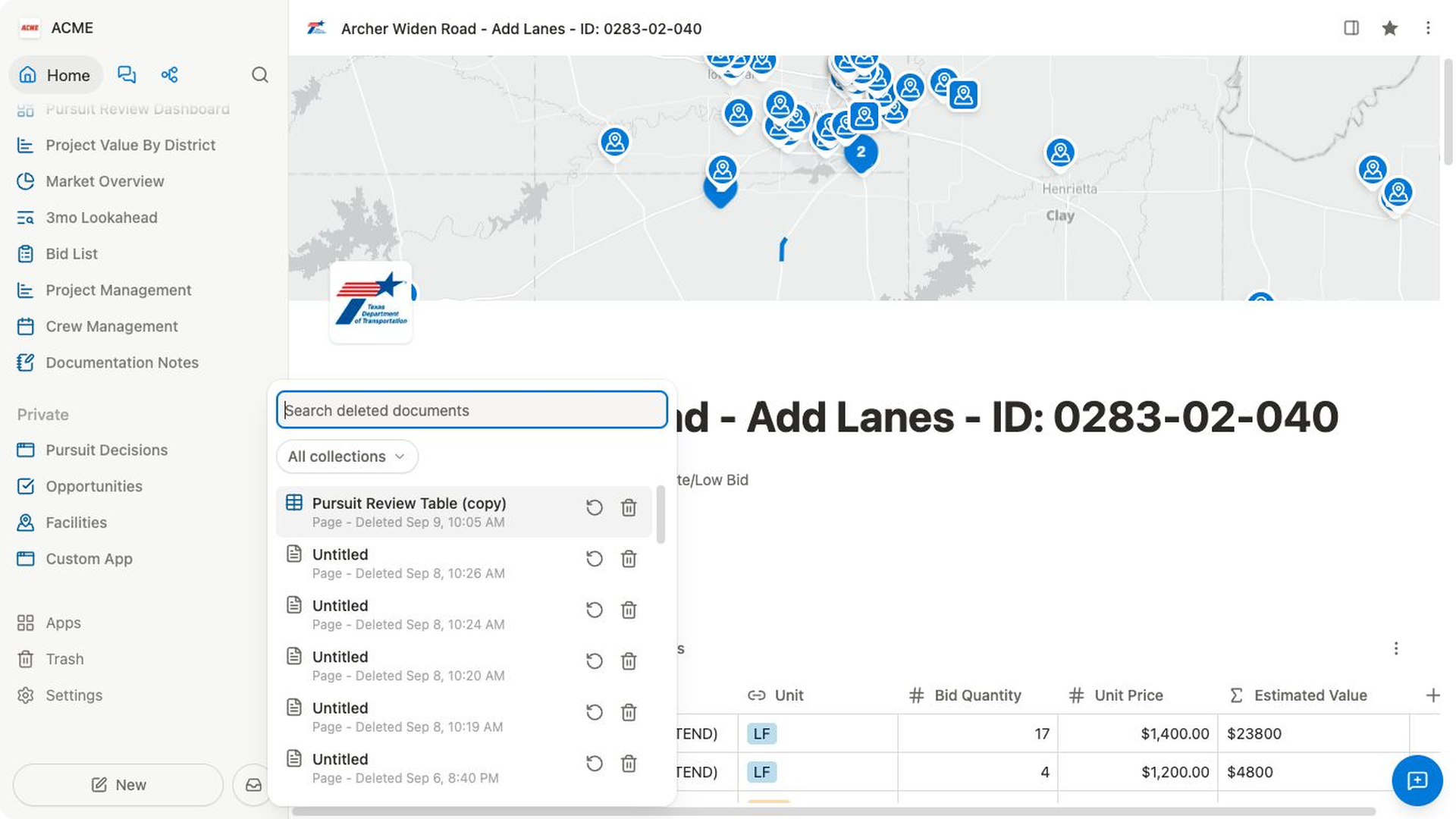
Find a deleted document
- Select
Trashnear the bottom of the sidebar. - Enter part of the document title in
Search deleted documents. - To narrow the list, select
All collections, then choose a collection. - Review the document title, collection, and
Deleteddate. - Scroll to load older results when the document is not in the first group.
To find a collection in a long filter list, enter its name in Search collections.... Select All collections again to remove the collection filter.
Restore a document
- Find the document in
Trash. - Select
Restoreon its row. - Look for
Document restored. - Confirm that the document disappears from the Trash list.
- Find the restored document in the sidebar or with [Global search](https://bidlo-help-center.mwolfe666.chatgpt.site/docs/navigation/global-search.
If the restored page is not where you expected in the sidebar, use Search... to find it, then move it to the correct section or parent.
Permanently delete a document
Permanent deletion removes an eligible document from Bidlo and cannot be undone.
- Find the document in
Trash. - Select
Delete permanentlyon its row. - In
Permanently delete?, review the document name and the warning that the action cannot be undone. - Select
Delete permanentlyonly when you no longer need the document. - Look for
Document permanently deleted.
Related pages
- Rename, duplicate, move, and delete
- Navigate with the sidebar
- Create and organize pages
- Public and private pages
- Permissions
FAQs
Why can’t I find a deleted document?
Clear the title search and choose All collections. You can see only deleted work available to you in the current team; another person’s private document does not appear in your Trash.
Why don’t I see Delete permanently?
The document is not eligible for permanent deletion. Restore it if you need it again, or leave it in Trash.
Can I empty Trash all at once?
No bulk Empty Trash action appears in the current interface. Permanently delete eligible documents one at a time.
How long do deleted documents stay in Trash?
Bidlo does not display an expiration date or retention window in Trash. Restore important work promptly.