Side panel
Keep one page in view while you inspect another page or record beside it.
Understand the side panel
The side panel divides your workspace into two areas. Your current page stays in the main area, and the item you choose opens beside it in a panel.
Opening an item in the side panel is a navigation action. It does not move, duplicate, or change access to either item.
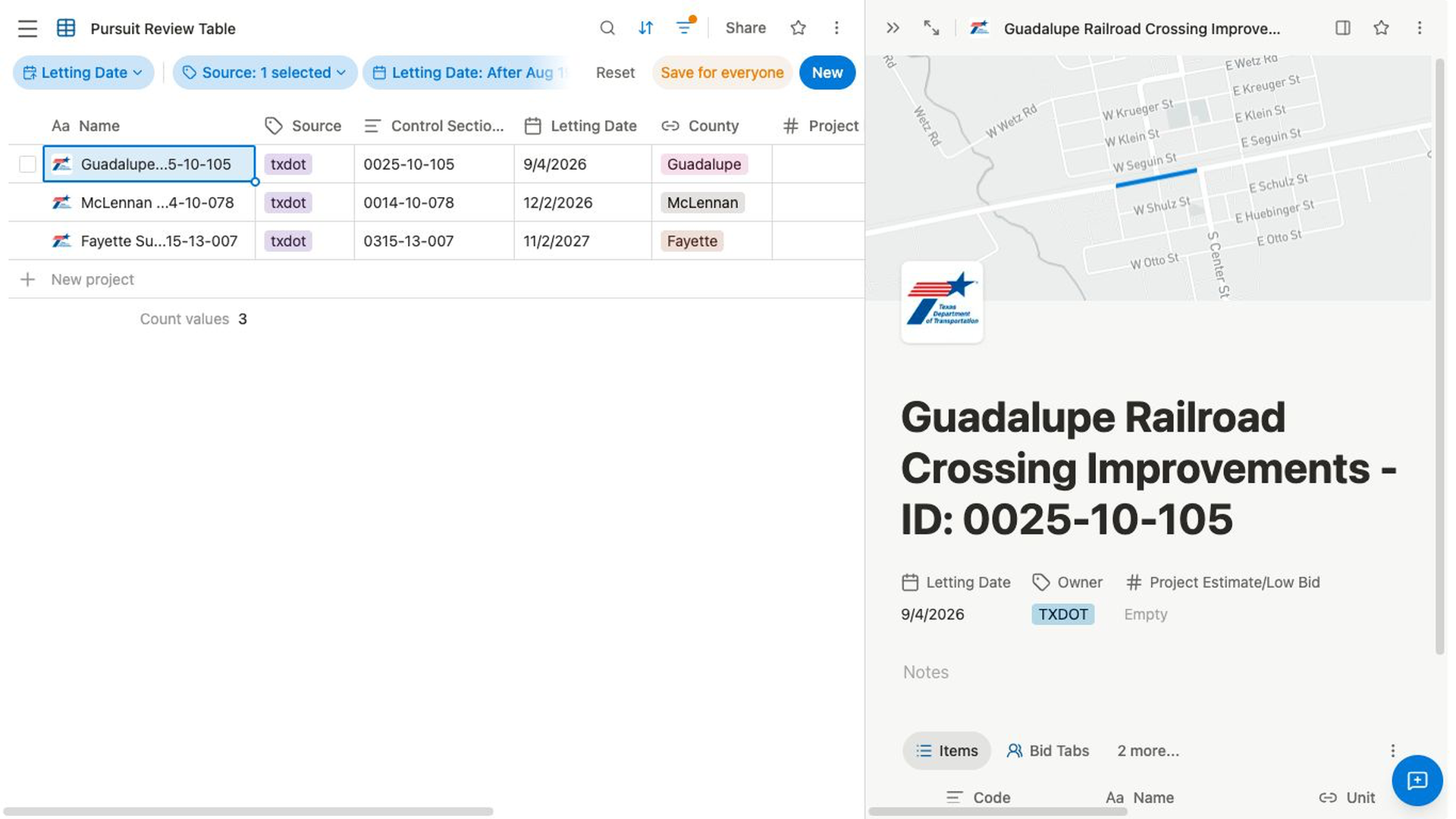
Open a search result in the side panel
- Select
Search...in the header, or press⌘ Kon Mac orCtrl Kon Windows. - Enter a title or keyword.
- Highlight or hover over the result you want to inspect.
- Select
Open in new panel. - Verify that the result appears beside the page you were already viewing.
Open an item from its actions menu
- Open the item’s actions menu where the option is available.
- Select
Open in side panel. - Verify that the item opens beside your current page.
For example, from a project you can open a related contractor or facility in the side panel and compare it without leaving the project. Some relation fields provide an Open in side panel action for the linked record. Available actions depend on the item and the part of Bidlo you are using.
Adjust or leave the panel
- Drag the divider between the main page and the panel to change the panel width. Bidlo remembers the width for later.
- Select
Open in full pagein the panel header to make the panel item your main page. This leaves the side-by-side view. - Select
Close panelto dismiss the panel and keep the underlying main page open.
Related pages
- Global search
- Rename, duplicate, move, and delete
- Collections and records
- Views overview
- Ask AI about a page
FAQs
Does opening an item in the side panel change the original?
No. The panel displays the existing item beside your current page. It does not move, copy, or change the item’s permissions.
What is the difference between Open in full page and Close panel?
Open in full page makes the panel item your main page. Close panel removes the panel and leaves the page underneath it open.
Why don’t I see Open in side panel?
The action is available only in supported menus and item contexts. Use Global search and look for Open in new panel, or open the item normally if the panel action is not available.