Global search
Find work, move around Bidlo, create something new, or start an AI chat without leaving the command palette.
Understand global search
The Command Palette combines search results with shortcuts called commands.
A word or phrase can return matching documents, while entries such as new page or settings profile offer an action instead.
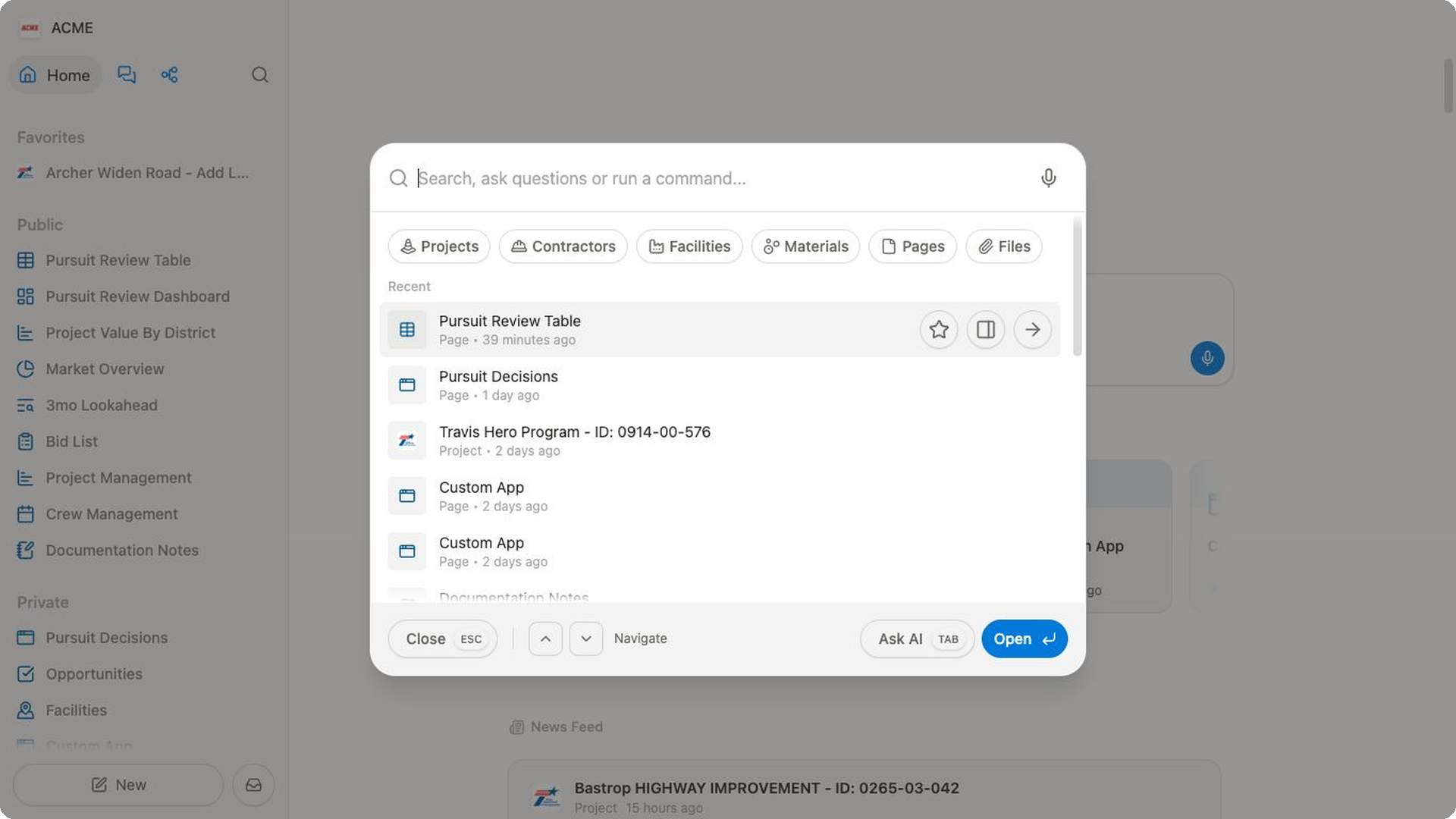
When you open search before typing, the Recent group shows work you opened recently. Search results can include pages, files, projects, contractors, facilities, and materials.
Find and open work
- Select
Search...in the header, or press⌘ Kon Mac orCtrl Kon Windows. - Enter a title or a useful keyword.
- Use the up and down arrow keys to highlight an item.
- Press
Enterto open it.
You can also hover over a result to reveal actions:
- Select the star to add or remove the item from
Favorites. - Select
Open in new panelto inspect the item while keeping your current page visible. - Select
Opento replace the current page with the result.
Press Esc or select Close to dismiss search.
The footer summarizes the keyboard controls: use the arrow keys to Navigate, select Open or press Enter to open the highlighted item, and use Tab for Ask AI.
Narrow results by collection
Use the collection buttons to limit results to Projects, Contractors, Facilities, Materials, Pages, or Files.
Select the active collection again to remove the filter.
This is especially useful during project review. When the result list contains several kinds of workspace data, select Projects to focus on project records.
You can also start typing a collection name or enter ! to see Search in suggestions. Choose a suggestion, then continue typing your query. Bidlo shows the active collection as a prefix, such as Projects: bridge.
Run commands
Type the beginning of a command, then choose the matching suggestion:
- Enter
hometo chooseGo to Home. - Enter
settingsto openSettingsor choose a specific settings page. - Enter
newto chooseNew Page,New Chat,New Project,New Contractor,New Facility, orNew File. - Enter a layout name, such as
tableorboard, to create that kind of page. - Enter
neworcreatefollowed by a collection name to create a page for that collection.
Available collections and settings pages depend on your workspace. Review the highlighted suggestion before pressing Enter, especially when the command creates new work.
Ask AI from search
Enter a question, then select Ask AI to start a chat with your text. You can paste files into the search field when the question needs their context;
the palette accepts up to five files of 20 MB each.
Press Tab to send the question to an AI chat in the side panel and keep your current page visible. You can also use the microphone in the search field, or press ⌘ E on Mac or Ctrl E on Windows to open search and begin dictating.
Related pages
FAQs
Why do I see Recent instead of search results?
Recent appears when the search field is empty. Start typing to replace it with matching results and commands.
Why does Enter start an AI chat?
When Bidlo has no selectable result or command for your text, Ask AI can become the default action. Check the footer before pressing Enter; use Esc if you only wanted to close search.
Can I search only for files?
Yes. Select Files, or choose Search in Files after typing !, then enter your query.