Verify AI answers
Treat a Bidlo AI response as a working result. Check what it used, what it may have missed, and the facts that matter before you use the answer to make a decision or change team data.
Start with inspectable context
Verification begins before you send the question. Give the chat a source you can open and compare with the answer.
- Open
Homeor selectChatfromChats. - Select the prompt labeled
Ask anything (@ to search).... - Type
@and search for the relevant Bidlo page or record, or useAdd Contextfrom the prompt menu. - Select the intended result so its reference appears with the prompt.
- Ask a focused question and request the source in the answer.
For example: “Using the mentioned project, list the bid date and project estimate. State the page you used and flag anything you couldn't verify.”
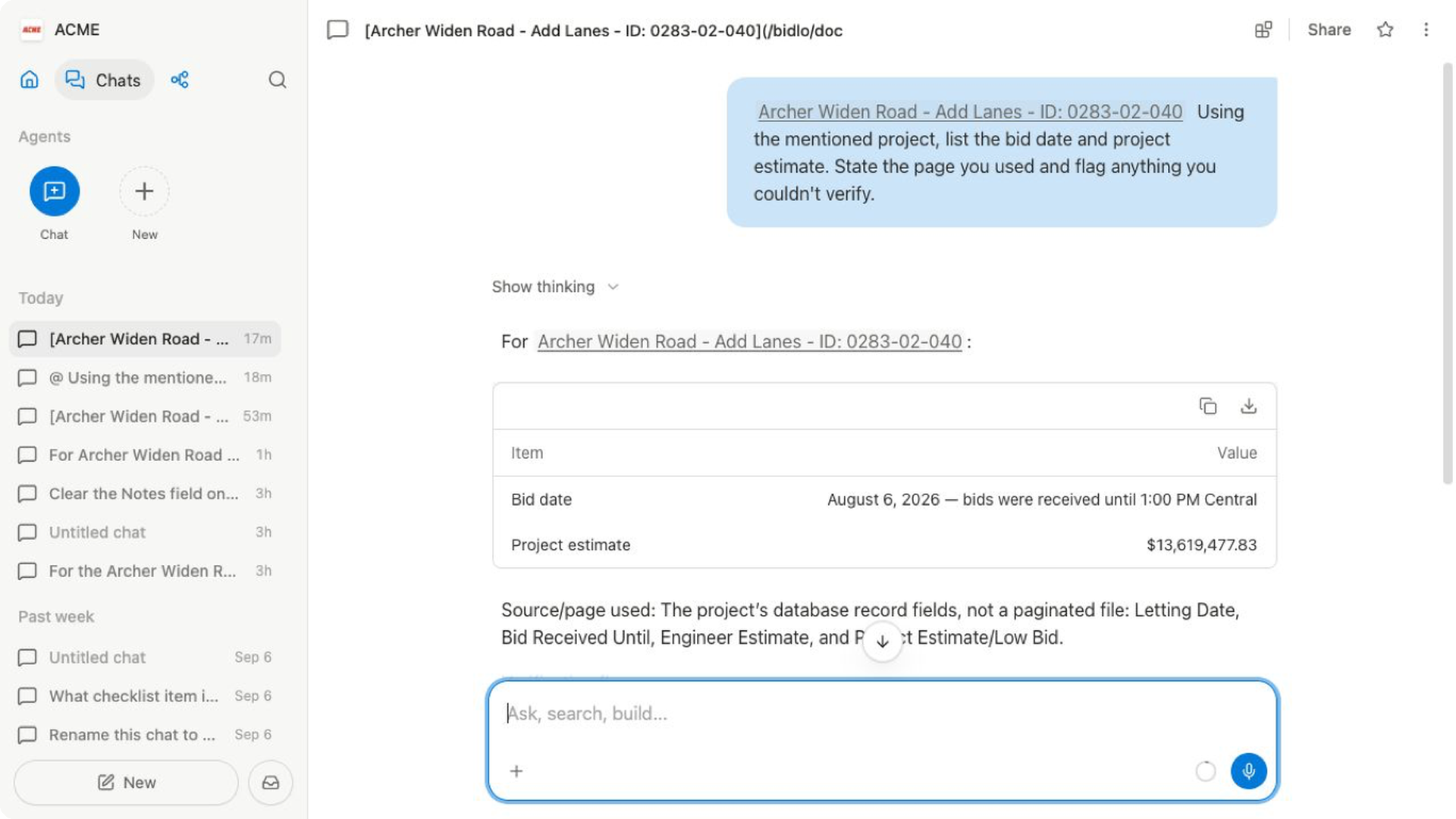
Attach a file separately when the answer depends on a specification, bid form, or other document. Turn on Web access when the question requires current outside information.
Check the answer against its source
Read the answer once for usefulness, then review it again for evidence.
- Identify every Bidlo page, file, or web source named in the response.
- Open the most important source independently.
- Find the original field, row, paragraph, or section that supports the claim.
- Compare the source wording, date, and surrounding context with the answer.
- Repeat for any fact that would change a bid, schedule, price, assignment, or external communication.
A source reference in the response is a useful starting point, not proof by itself. Make sure the reference opens the expected object and actually supports the statement beside it.
Inspect how Bidlo reached the answer
Select Show thinking when it appears beneath your message. The expanded trace can show visible steps such as Searching for document context, Search notes, Clarifying document access, and Query mentioned document.
Use the trace to answer two questions:
- Did Bidlo look in the source you intended?
- Did a search, access, or tool step fail or use a fallback?
The trace helps explain the route to the answer, but it doesn't validate the answer's facts. Always compare important claims with the underlying source.
Check the details that carry risk
Use this checklist before relying on an answer:
| Check | What to compare |
|---|---|
| Source | The named page, record, file, or website is the one you intended |
| Scope | The answer covers the correct project, records, geography, and time period |
| Identity | Project names, IDs, agencies, people, and locations match the source |
| Numbers | Dates, quantities, units, currency, totals, and percentages are exact |
| Status | Current state is distinguished from historical, proposed, or inferred information |
| Completeness | Missing fields, conflicting sources, and uncertainty are stated instead of filled in silently |
For summaries and recommendations, also separate facts copied from a source from conclusions generated by the assistant.
Correct an answer in the same chat
When the source and answer disagree, keep the relevant context attached and send a precise correction. For example:
- “Use the
Bid datefield, not the date mentioned in the notes.” - “Limit the answer to the three records I mentioned.”
- “The source is from last quarter. Recheck the current record.”
- “Quote the field name and value for each project, and mark missing values as unknown.”
- “Separate source facts from your recommendation.”
Review the revised answer from the beginning. A correction to one claim does not automatically validate the rest of the response.
Verify changes separately
If the conversation results in a data change, open the destination page or record after Bidlo reports completion. Confirm the saved values, the number of affected records, and any unchanged fields that matter.
When an action requires approval, review the proposed target and scope before it runs, then perform this source check again on the saved result.